30. MCP Auth and CIMD
Finally MCP Auth is being implemented and adopted in a standardized way - Let’s learn that and learn CIMD
While I worked at Google during the publishing of this post / video, the views expressed here are my own and may not reflect those of my employer. Only publicly available material is used to put together the content of this article. The website and the Youtube videos are NOT monetized.
In this post and video you are going to learn in the simplest, shortest and the most complete way possible -
- MCP Auth
- CIMD (Client ID Metadata Documents) and it’s role in MCP / Agentic Auth
So that’s the What, now let’s tackle Why and How.
Why?
- Everything is becoming agentic now. And as we have learnt in Security Of, From and Using AI your Agent and MCP servers must be Authenticated (and operations should be properly authorized)
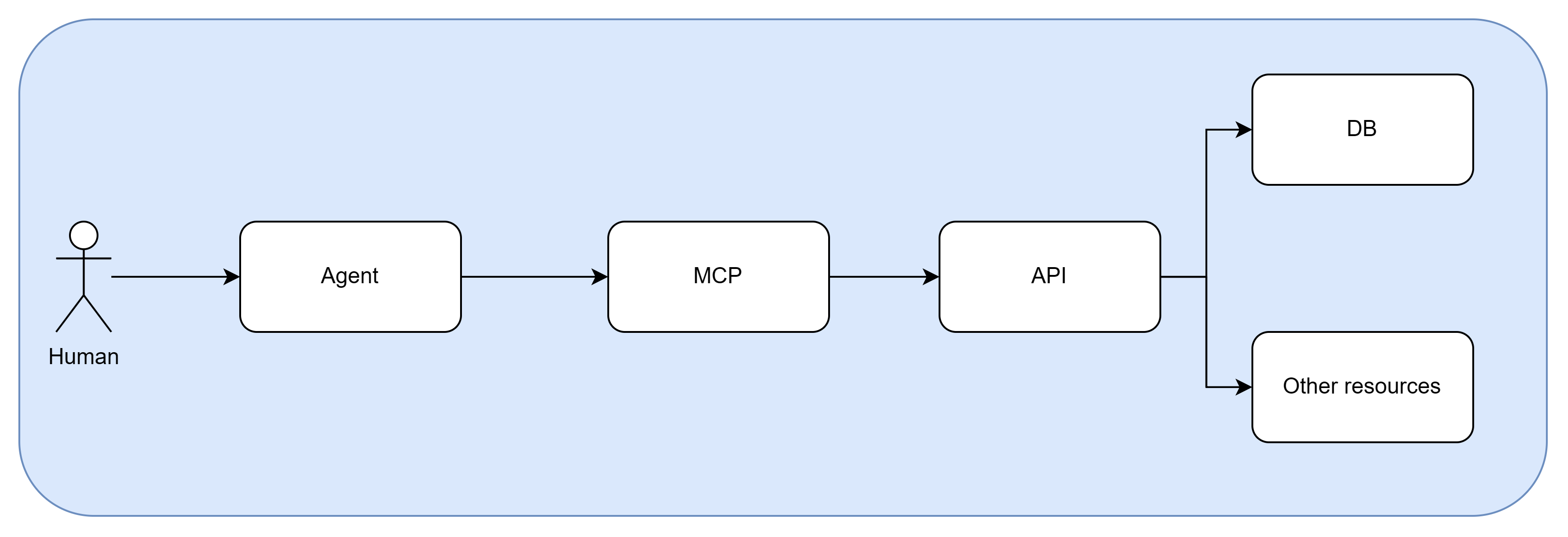
- The general pattern is shown below.
- At a minimum agents need to be authenticated as the humans that are operating them (non human identities can operate agents too, like Service accounts and SPIFFE - but that is not the subject of this post - please let me know if you want a demo / blog on that one as well).
How?
How the MCP Authorization Flow Works (if this sounds daunting - don’t worry the demo will make things clear)
- Unauthenticated Request: The MCP client (generally an agent) sends a tool or resource request to the MCP server without a token.
401 Unauthorized& PRM Discovery: The MCP server responds with anHTTP 401Unauthorized and includes aWWW-Authenticateheader pointing to its Protected Resource Metadata (PRM - RFC 9728).- Authorization Server Discovery: The client fetches the PRM to locate the authorization server, then queries the authorization server’s metadata (RFC 8414).
- Authorization Request (with PKCE & Resource Indicator): The client opens the user’s browser with the authorization URL, including a PKCE
code_challenge, scope selections, and theRFC 8707resource parameter. - Token Exchange: Once the user approves, the authorization code and
code_verifier are exchanged for a Bearer access token (and optional refresh token) bound to that exact MCP resource. - Authenticated Communication: The client attaches the Authorization: Bearer
header to subsequent MCP calls.
CIMD (Client ID Metadata Documents) and it’s role in MCP / Agentic Auth
CIMD (Client ID Metadata Document) is an OAuth 2.0/OIDC mechanism where an application’s client ID is a secure URL pointing to its own self-hosted JSON configuration file. This allows authorization servers to dynamically fetch and verify client metadata (like redirect URIs) on demand without requiring manual pre-registration.
The demo should clear things up for you, but here is the comparison between various modes that are used to create clients on an OIDC authorization server.
Also, to understand why it makes sense to use CIMD clients for your Agents - please check out this Okta Blog
Comparison: Manual vs. DCR vs. CIMD
| Feature | Manual Setup | DCR (RFC 7591) | CIMD (Client ID Metadata Document) |
|---|---|---|---|
| Zero-Touch Automation | ❌ None (admin copies & pastes URIs) | ⚠️ Partial | ✅ Fully automated & zero-touch |
| Enterprise Security (Disabled by Default) | N/A | ❌ Blocked by Okta/IdPs (requires admin-minted Initial Access Token) | ✅ Enterprise-friendly (resolves public HTTPS URL) |
| Trust & Provenance | Admin-vetted | ❌ Spoofable (anyone can POST client_name="Google") | ✅ Built-in TLS/DNS trust (hosted on antigravity.google) |
| Key Rotation & Updates | ❌ Manual re-entry in IdP | ❌ Must call RFC 7592 API on every tenant | ✅ Single file update (IdPs re-fetch live JSON) |
| Client Storage & State | Must store static credentials | ❌ Stateful (must store unique ID/secrets per tenant) | ✅ Stateless (single universal URL everywhere) |
Demo
Please watch in full screen or on Youtube directly
Thank you for reading through!
Please share 🔗 if you think it’s useful! And please comment ✍ if you want to discuss more!
— Nikhil